Habit Tracker for Obsidian Daily Notes
Two dataview queries that track habits in your daily notes. No extra plugins, no configuration - just drop the code into your daily note template.
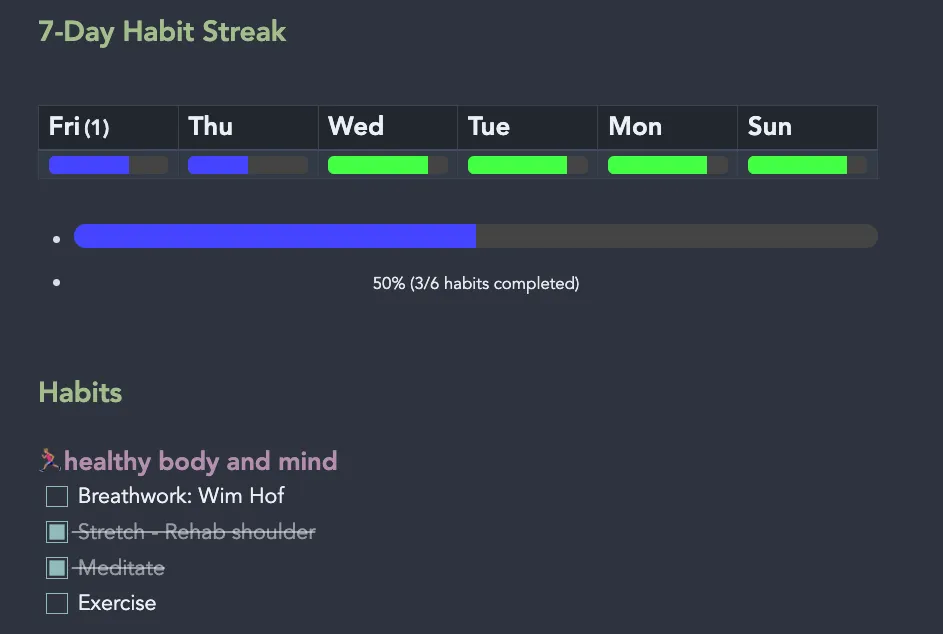
What you get:
- Today’s progress bar with completion percentage
- 7-day streak view with color-coded mini progress bars
- Automatic detection of any tasks under
### Habitsheading
Colors: Red (<25%), Blue (25-74%), Green (≥75%)
Today’s Progress
Shows completion percentage for today’s habits.
// Get current page's tasks
const tasks = dv.current().file.tasks;
// Function to determine color based on percentage
function getProgressColor(percentage) {
if (percentage < 25) return "#ff4444"; // Red
if (percentage < 75) return "#4444ff"; // Blue
return "#44ff44"; // Green
}
// Function to create progress bar
function createProgressBar(completed, total) {
if (total === 0) return "No tasks";
const percentage = Math.round((completed / total) * 100);
const color = getProgressColor(percentage);
return dv.paragraph(
dv.el("div", [
dv.el("div",
dv.el("div", "", {
attr: {
style: `width: ${percentage}%; height: 100%; background-color: ${color}; transition: width 0.5s ease-in-out;`
}
}),
{
attr: {
style: "width: 100%; height: 20px; background-color: #444; border-radius: 10px; overflow: hidden;"
}
}
),
dv.el("div", `${percentage}% (${completed}/${total} habits completed)`, {
attr: {
style: "text-align: center; margin-top: 8px; font-size: 14px; color: var(--text-muted);"
}
})
], {
attr: {
style: "width: 100%; margin: 8px 0;"
}
})
);
}
// Get completion stats
const totalCompleted = tasks.where(t => t.completed).length;
const totalTasks = tasks.length;
// Create output
createProgressBar(totalCompleted, totalTasks);7-Day Habit Streak
Shows the last 6 days with mini progress bars. Dynamically reads tasks from the ### Habits section of each daily note.
Note: Update the filePath pattern on line 55 to match your daily notes folder structure.
// Get last 6 days (excluding today) - Friday back to Sunday
const today = dv.current().file.day;
const days = [];
for (let i = 1; i <= 6; i++) {
const date = moment(today).subtract(i, 'days');
days.push({
date: date.format('YYYY-MM-DD'),
dayName: date.format('ddd')
});
}
// Function to extract habit tasks from file content
async function getHabitStats(filePath) {
try {
const file = app.vault.getAbstractFileByPath(filePath);
if (!file) return { total: 0, completed: 0, percentage: 0 };
const content = await app.vault.read(file);
const lines = content.split('\n');
let inHabitsSection = false;
let totalTasks = 0;
let completedTasks = 0;
for (const line of lines) {
// Check if we're entering the Habits section
if (line.trim() === '### Habits') {
inHabitsSection = true;
continue;
}
// Check if we've left the Habits section (new ## or ### heading)
if (inHabitsSection && line.match(/^##[^#]/)) {
break;
}
// Count tasks in the Habits section
if (inHabitsSection) {
if (line.match(/^- \[x\]/i)) {
totalTasks++;
completedTasks++;
} else if (line.match(/^- \[ \]/)) {
totalTasks++;
}
}
}
const percentage = totalTasks > 0 ? Math.round((completedTasks / totalTasks) * 100) : 0;
return { total: totalTasks, completed: completedTasks, percentage: percentage };
} catch (e) {
return { total: 0, completed: 0, percentage: 0 };
}
}
// Color function
function getProgressColor(percentage) {
if (percentage < 25) return "#ff4444"; // Red
if (percentage < 75) return "#4444ff"; // Blue
return "#44ff44"; // Green
}
// Build data for each day
const dayDataPromises = days.map(async day => {
const filePath = `Planner/📆 Daily Notes/2026/02-February/${day.date}.md`; // UPDATE THIS PATH
const stats = await getHabitStats(filePath);
return {
dayName: day.dayName,
percentage: stats.percentage
};
});
const dayData = await Promise.all(dayDataPromises);
// Create table headers (day names)
const headers = dayData.map(d => d.dayName);
// Create progress bars row
const progressBars = dayData.map(d => {
const color = getProgressColor(d.percentage);
return dv.el("div",
dv.el("div", "", {
attr: {
style: `width: ${d.percentage}%; height: 100%; background-color: ${color}; transition: width 0.3s ease-in-out;`
}
}),
{
attr: {
style: "width: 100%; height: 15px; background-color: #444; border-radius: 5px; overflow: hidden;"
}
}
);
});
// Display table
dv.table(headers, [progressBars]);How to Use
- Add a
### Habitssection to your daily note template - Add habit checkboxes under that section:
### Habits
- [ ] Meditate
- [ ] Exercise
- [ ] Read- Paste the code blocks anywhere in your daily note
- Update the file path in the 7-day tracker to match your folder structure
Customization:
- Change color thresholds: Edit the
getProgressColor()function - Adjust number of days: Change
i <= 6to your preferred range - Modify bar height: Change
height: 15pxorheight: 20pxvalues
Works with any habits - the code automatically detects tasks under the ### Habits heading, so you can change habits anytime without updating the code.