Personal Finance in Obsidian with hledger and Claude Code: Complete Setup Guide

I’ve been using personal finance managers for over two decades. Mint until Intuit shut it down, then Simplifi after that. In 2020 I built one too — a mobile PFM that didn’t find traction in the market. So I’m not new to the category.
Plain-text accounting (PTA) tempted me for years and I never crossed the line. The tools were obviously better than the SaaS apps I was paying for: local, queryable, version-controlled, no vendor risk, no monthly fee. The wall was always the labor — writing CSV import rules with the right regex anchors, hand-tagging transactions to slice across categories, maintaining reports that any decent budgeting app would render in a click. The setup that experienced PTA users called “an afternoon” felt to me like a weekend, and then another weekend a month later when the rules broke against a new bank statement format.
Then Claude Code happened.
I’d been watching it work on the markdown files in my Obsidian vault for a few months — handling project notes, weekly reviews, daily logs with actual judgment, not just pattern-matching. At some point I noticed I was trusting it on tasks I wouldn’t have delegated to anyone else. And then I wondered: could I bring my financial data into this same workflow? Could Claude Code do the labor that always blocked me from PTA?
This article is what came out of that question.
One thing to get out of the wayIf you’re queasy about Claude Code reading your financial transactions, this article probably isn’t for you. But if you’re already using Claude Code with your Obsidian vault, you might be more comfortable than you think: the agent is already seeing your project notes, your drafts, your daily logs, your meeting summaries. My take is that my expenses aren’t more interesting than the rest, and the integration is worth the disclosure. Your opinion might be different.
The problem isn’t categories — it’s labor
PFMs aren’t bad at categorization. Simplifi has tags, custom categories, and rules. The category model isn’t broken. What’s broken is the work.
When I think about what an Amsterdam weekend cost, I don’t think Dining and Transport and Entertainment — I think Amsterdam. I want one number that includes the flights I booked weeks earlier, the rideshare to the airport, the bakery breakfast on the morning we left, the train back from the hotel. Simplifi could store all of that, tagged amsterdam, if I were willing to find every relevant transaction across two months of statements and tag each one by hand. PTA would let me do the same thing with a trip:amsterdam-2026 tag. The capability isn’t the difference. The work is the difference.
And the work doesn’t reward itself. Tagging two months of statements gets me one number for one trip. The next trip requires the same labor again. Slicing spending with friends across the year requires more. Every cross-category question I want to answer is another evening of manual data entry, and after a few rounds you stop asking the questions — which means you stop having the system you set out to build.
What changes inside the vault is that I don’t need to find every relevant transaction. Claude does. The Amsterdam project note already exists — I wrote it weeks before the trip, with the dates, the hotel name, the booking confirmations, the concert venue, the transit notes. My daily notes from that weekend exist too, with the bakeries we stopped at and the restaurants we ate at. None of this was created for the finance system. It was the trip plan, then the trip log. The fact that it’s also the most complete source of truth for tagging the financial side is a side effect of putting finances in the same place as everything else.
So the flow becomes: I hand Claude the project file and say find everything related and tag it. Claude reads the project note for dates and pre-booked vendors. It cross-references the daily notes for the venues and merchants I mentioned during the trip. It queries the journal across the relevant date range. It presents the ambiguous transactions for me to judge, and tags the rest. The Amsterdam project note now ends with an Expenses block: 42 transactions, around $1,700 total, broken out by category. (Numbers nudged a little for this article — the gist is real.)
That’s the unlock. Not “an AI helps you tag.” When your agent has the full context from your vault, every integration has a compounding effect. The vault already contains the context, and the agent already has access to all of it. PTA is just the data format that lets the agent write back.
The Amsterdam loop, end to end
Here’s what the trip-tagging loop actually looks like.
A few weeks before the trip I created a project note: PR-2026-Amsterdam.md. It has the dates, the hotel name and Schiphol location, the airline and routing for the flights, the concert venue, transit notes for the trams and trains. Standard travel-planning artifact. I write one of these for every trip whether or not there’s any finance system involved.
The trip happens. I take some daily notes during it — the bakery on the second morning, the Thai restaurant near the venue, the late-night stop on the way back to the hotel.
Two weeks later, the Simplifi exports through that period have all settled. The journal is current. I open a Claude Code session in the vault and say: Read PR-2026-Amsterdam.md and the daily notes from May 15–17. Find every transaction in finances.journal that belongs to this trip — including pre-booked flights and hotel from weeks earlier — and tag them trip:amsterdam-2026. Show me the ambiguous ones before tagging.
Claude reads the project note. It pulls the date range and the booking metadata. It greps the journal for the airline payee, finds the round-trip and one-way charges from six and four weeks before departure. It scans the daily notes for vendor names and matches them against transactions on the trip dates. It builds two lists: confirmed candidates (the flight, the hotel, the obvious in-Amsterdam dining) and ambiguous ones (an Albert Heijn charge that could be local or a Granada grocery run that happened to fall during the trip; a rideshare in Malaga that might be the airport drop or might be unrelated).
I look at the ambiguous list, mark which ones belong, hand it back. Claude edits the journal — appends ; trip:amsterdam-2026 to the comment line on each tagged transaction — and then writes an Expenses summary block to the bottom of the project note, totaled and broken out by category. The whole loop is twenty minutes of my attention, most of it spent on the dozen ambiguous transactions.
The Expenses block ends up looking like this:
## Expenses
Tagged `trip:amsterdam-2026` in hledger. 42 transactions,
~$1,700 total (net of one small refund).
| Bucket | Amount | Notes |
|---|---:|---|
| Travel:Airfare | $620 | Three flight legs |
| Travel:Hotel | $430 | Two nights near Schiphol |
| Dining | $270 | Restaurants, bakeries, cafés |
| Groceries | $105 | Albert Heijn × 4, Marqt, AH To Go × 2 |
| Entertainment | $93 | Concert tickets |
| Travel:Transport | $58 | Rideshares to/from the airport |
| Transport:Public | $58 | GVB/NS trams + trains |A year from now I can ask the journal what did Amsterdam cost? and get the answer in milliseconds. Or how much have I spent on trips this year? — every project note with a trip:* block contributes, automatically. The labor of building that index happened once, after the trip, with Claude doing the searching and me doing the judgment calls.
The pattern generalizes beyond trips. A weekend hosting visitors gets tagged community:host-may. A renovation project gets tagged with the project slug. The principle is the same every time: an event lives outside the finance system as a project note or a daily-note thread, and Claude’s job is to map the financial transactions back to it.
What this system is made of
Three components, each doing one thing.
hledger is the accounting engine. Plain-text journal file, double-entry, double-zero errors, queryable from the command line. I picked hledger over Ledger and Beancount because of one flag: --output-format json. Every hledger command can return structured output, which is what makes the agent loop tight. Full comparison further down for anyone choosing.
Obsidian is the container. The journal lives at Planner/Finance/finances.journal alongside everything else in the vault — project notes, daily notes, weekly reviews. That co-location is the point. The vault isn’t where the finance system lives; the finance system is one collection of files inside the larger thing.
Claude Code is the agent. It reads the journal, writes the rules file, tags transactions, generates the weekly report, sometimes runs the import script. It also reads everything else in the vault — which is what lets it tag the Amsterdam trip from the project note, not from an in-app form.
There are existing Obsidian plugins that approximate parts of this — Hledger Notes and ledger-obsidian both let you enter transactions through Obsidian’s UI. They’re worth knowing about. The CLI-first approach in this guide trades the friendly entry UI for full access to hledger’s query language and JSON output, which is what makes Claude useful as an agent and not just a chatbot pasted in next to a form.
The weekly report
The trip-tagging loop is the most distinctive thing the system does, but the everyday surface is the weekly report. Every Sunday morning, an email lands in my inbox with a markdown report of the previous week’s spending. I read it with coffee.
The report layers spending into three buckets, because no two weeks are the same and raw totals are misleading.
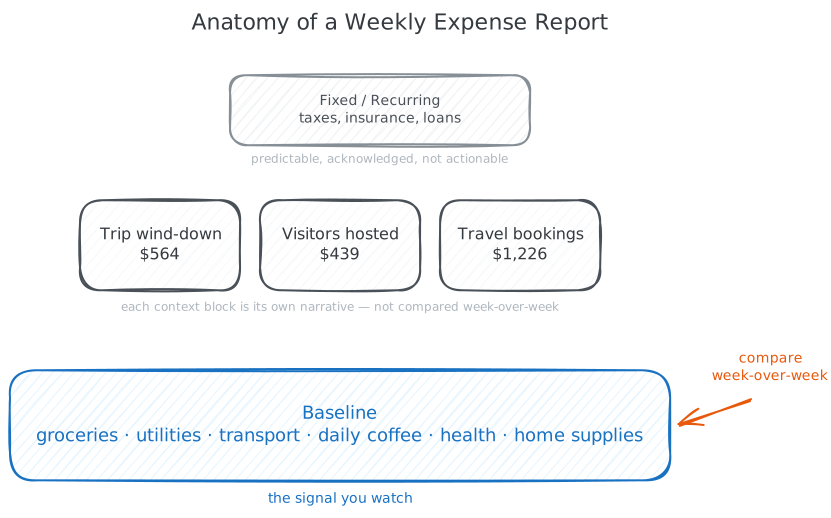
Baseline is the recurring spend that happens every week regardless of what else is going on: groceries, utilities, local transport, daily coffee, health, home supplies. This is the signal I watch — the week-over-week comparison that shows whether my normal life is drifting.
Context blocks are one-off events that drove non-baseline spending this week. A trip wind-down, visitors hosted, a quarterly home repair. Each block has its own short narrative and transaction table. These are not compared week-over-week because each block is unique.
Fixed and recurring sits at the top — taxes, insurance premiums, loan payments. Acknowledged, not actionable.
The report opens with a one-line summary and a Mermaid pie chart that renders inline in Obsidian and in the emailed HTML. The comparison table at the bottom shows baseline categories only, this week vs last week, with a delta column. Context blocks explain everything else.
Generating this report is Claude’s job. It runs unattended every Sunday morning via a wrapper script around claude -p (headless Claude Code): it reads the prompt file, queries hledger, classifies transactions into layers, writes the markdown, and — if a report was written — emails it before exiting. The full prompt and wrapper script are below.
What I learned
A few things that aren’t obvious going in.
The prompt is the specification. The wrapper that runs the weekly report is forty lines of shell. The judgment about what counts as baseline, how to handle reimbursements, when to refuse to overwrite a hand-edited report — all of that lives in a markdown prompt file. I iterate on the prompt interactively in a Claude Code session, test it by running the wrapper, and the change ships. Months from now I’ll read the prompt and know exactly what the report is supposed to do. That’s a better operating manual than I’ve ever written for a piece of software I owned.
Trust requires confirmation. Claude can find candidates with high recall, but it doesn’t know which Albert Heijn charge belongs to the Amsterdam trip versus a Granada grocery run on the same day. The system works because I confirm the ambiguous cases. Skipping that step would silently corrupt the journal over months — by the time you noticed, you wouldn’t trust the tags anymore. The human-judgment step isn’t a friction tax. It’s the integrity check.
The README is documentation for both audiences. Every convention this system uses — tag format, account hierarchy, what counts as baseline, the import workflow — lives in a README.md alongside the journal. Future-me reads it. Claude also reads it at the start of every session before doing anything in the Finance folder. The README is the working memory that makes the system self-documenting. This pattern generalizes far beyond finance, but finance is where I noticed it.
Incremental imports preserve curation; full reimports destroy it. The CSV import is idempotent on date dedup, so re-running it is safe. A --full reimport rebuilds the journal from all CSVs and wipes every manual tag, every reclassification, every hand-written note. I learned this by losing a week of trip tagging. Now --full is a last-resort move I take only after staging the journal in git.
Tagging discipline scales the value. A misspelled tag (trip:amsterdam-2026 vs trip:Amsterdam-2026) creates a silent split that hides itself until you ask the question that exposes it. I settled on lowercase-kebab-case for every tag value and put that in the README. The convention has to be stable across years if the tags are going to mean anything across years.
Caveats
You still need a data source. hledger doesn’t connect to your bank. The ingestion step needs a budgeting app’s CSV export, a direct bank export, or browser automation against your bank’s site. PTA is the analysis layer; ingestion is a separate problem that Playwright can solve cleanly for most modern web apps. The setup below includes one approach.
Claude doesn’t know your life. The agent can find transactions, suggest categories, flag anomalies. It can’t tell you whether a restaurant charge was a business dinner or a date night. Tagging without confirmation drifts; confirmation is where the value is added.
This is an analysis layer, not a behavior-change tool. The journal tells me where money went. A weekly report makes that visible. Whether seeing it consistently changes anything — that’s an experiment you run on yourself. The tool doesn’t decide for you.
The section above is the story of why this system exists and what it does. Below is the spec for how to build it. If you’re handing this URL to Claude Code so it can set the system up for you, the information below is what it needs.
Prerequisites
- macOS or Linux with a terminal (Windows works inside WSL)
- Homebrew for installing hledger
- An Obsidian vault — this guide assumes the journal lives in
Planner/Finance/, adjust to your structure - A bank or budgeting app that can export CSV (Simplifi, YNAB, Monarch, Lunch Money, Tiller, or direct bank CSVs all work — only the rules file changes)
- Claude Code installed and configured
Steps 1–6 work without Claude Code; they’re just much more work. Steps 7–8 (weekly report, automated pull) specifically depend on it.
Step 1: Install hledger
brew install hledger
hledger --versionYou should see 1.40 or higher. hledger ships as a single binary with no runtime dependencies.
On Linux, use your distro’s package manager or the official install guide. On Windows, install inside WSL.
Step 2: Create your journal and account hierarchy
cd "/path/to/your/vault"
mkdir -p Planner/Finance
cd Planner/Finance
touch finances.journalOpen finances.journal and put an opening-balances transaction at the top:
2026-01-01 opening balances
Assets:Checking:Bank 5000.00
Liabilities:CreditCard:Visa -1200.00
Equity:OpeningBalancesThe third posting has no amount — hledger infers it so the entries balance. Standard pattern.
Then sketch the account hierarchy you want. Colons separate levels. Start broad; split into subcategories only when a category gets unwieldy.
; Account hierarchy
; Assets:Checking:Bank
; Liabilities:CreditCard:CardName
; Expenses:Category[:Subcategory]
; Income:Source
; Equity:OpeningBalancesSuggested expense layout:
Expenses:Dining:Restaurants,Expenses:Dining:Coffee,Expenses:Dining:BarsExpenses:GroceriesExpenses:Transport:Gas,Expenses:Transport:Rideshare,Expenses:Transport:PublicTransitExpenses:Travel:Airfare,Expenses:Travel:Hotel,Expenses:Travel:TransportExpenses:Home:Rent,Expenses:Home:Utilities,Expenses:Home:SuppliesExpenses:Health,Expenses:Entertainment,Expenses:Shopping
Validate:
hledger -f finances.journal balanceYou should see your opening balances split by account.
Step 3: Get your bank data in
The journal needs transactions. The options:
- A budgeting app that exports CSV — Simplifi, YNAB, Monarch, Lunch Money, Tiller. Categories come pre-attached. Easiest path.
- Direct bank CSV — Cleaner raw data, no pre-categorization, slightly more rules-file work.
- Plaid-based aggregator — Tools like Maybe Finance (self-hosted) handle aggregation but require infrastructure.
This guide uses Simplifi as the example. The rules file is what changes for other sources; the rest of the pipeline is identical.
Drop the CSV in the Finance directory with a date-stamped name:
Planner/Finance/Simplifi - 2026-04-25.csvStep 4: Write the CSV import rules file
This is the file Claude can build for you from a sample CSV. Paste a few rows of your export plus your category list into a Claude Code session, ask it to generate simplifi.rules, and iterate from there. Doing this by hand is the work the original PTA workflow makes you do; you don’t have to anymore.
Minimal structure of the rules file:
skip 1
fields date, payee, _, category, _, _, amount, _, _, account, _
date-format %-m/%-d/%Y
currency $
account1 Assets:Unknown
account2 Expenses:Unknown
if %account "Adv Tiered Interest Chkg - 7121"
account1 Assets:Checking:Bank
if %account "Visa Credit Card"
account1 Liabilities:CreditCard:Visa
if %category Dining & Drinks:Restaurants
account2 Expenses:Dining:Restaurants
if %category Groceries
account2 Expenses:Groceries
if %category Travel:Airfare
account2 Expenses:Travel:Airfareaccount1 is the source (bank or credit card); account2 is the destination (expense category). if blocks pattern-match the CSV and override the defaults.
Dry-run to inspect output before committing:
hledger -f finances.journal import "Simplifi - 2026-04-25.csv" \
--rules-file simplifi.rules --dry-runReal run drops --dry-run.
Gotchas Claude needs to know about
These are the non-obvious failure modes in the rules file. Worth surfacing in the README so future Claude sessions don’t relearn them.
- Patterns are case-insensitive POSIX regex, unanchored by default. A pattern like
NAmatches “Donations”, “Financial”, “Personal” — anything containing those letters. Anchor short patterns:^NA$. - Last match wins. Rules apply top to bottom; the last matching
ifblock sets the value. Order parent-category rules before specific subcategory rules so the subcategories override. - Single-digit days need
%-d, not%d. A CSV with dates like4/9/2026fails silently with%d. Switch to%-dand the missing rows appear. - Currency symbols in the amount column. hledger handles
$natively. Other symbols need a matchingcurrencydeclaration. - Self-transfers create artifacts. If your budgeting app exports a transfer between your own accounts with the destination as the category, you’ll see a growing
Assets:Transferbalance. Either write a rule mapping it explicitly or exclude it from expense queries. - Unmapped categories land in
Expenses:Unknown. Runhledger bal Expenses:Unknownperiodically and add rules for whatever’s accumulating.
Step 5: The import script
Wrap the import command so the weekly workflow is one invocation. Save as import.sh in Planner/Finance/:
#!/bin/bash
set -euo pipefail
cd "$(dirname "$0")"
JOURNAL=finances.journal
RULES=simplifi.rules
if ["${1:-}" == "--full"](/obsidian/1-full/); then
: > "$JOURNAL"
for csv in $(ls -1 Simplifi*.csv | sort); do
echo "Importing $csv..."
hledger -f "$JOURNAL" import "$csv" --rules-file "$RULES"
done
elif [-n "${1:-}"](/obsidian/n-1/); then
hledger -f "$JOURNAL" import "$1" --rules-file "$RULES"
else
latest=$(ls -1t Simplifi*.csv | head -1)
echo "Importing $latest..."
hledger -f "$JOURNAL" import "$latest" --rules-file "$RULES"
fiMake it executable: chmod +x import.sh.
Two modes:
- Incremental (default) imports a CSV and appends only transactions newer than the last-seen date. Safe to run repeatedly on overlapping date ranges. This is the mode you want once you’ve started tagging.
- Full reimport (
--full) truncates and rebuilds. Wipes manual edits. Use only when fixing a rules-file bug, and only after committing the current journal to git.
Step 6: Tagging
Tags are key-value pairs added to a transaction’s comment line:
2026-04-05 Restaurant Name ; trip:paris-2026
Expenses:Dining:Restaurants 53.39
Liabilities:CreditCard:Visa -53.39Multiple tags on one transaction:
2026-04-10 Flamenco Show ; community:friend-name, friend + niece; reimbursedQuery by tag:
hledger -f finances.journal bal tag:trip=amsterdam-2026
hledger -f finances.journal bal tag:community
hledger -f finances.journal bal tag:community=friend-nameThe Claude-driven tagging workflow
This is where the system pays off. The flow is the same for trips, hosted visitors, projects, anything that has its own note in the vault:
- Open a Claude Code session scoped to the vault root
- Point it at the project note and any relevant daily notes
- Ask it to find every related transaction in
finances.journaland tag them - Review the ambiguous list it presents; confirm or reject
- Claude appends the tag to the comment line on each tagged transaction
- Claude writes a summary Expenses block to the project note
The prompt I use, roughly:
Read PR-2026-Amsterdam.md and the daily notes from May 15–17.
Find every transaction in Planner/Finance/finances.journal that
belongs to this trip — including pre-booked flights and hotel
from weeks earlier. Tag them trip:amsterdam-2026 in hledger
syntax (comment line after the description). Show me the
ambiguous candidates before tagging anything.
After I confirm, write an Expenses summary block to the bottom
of the project note with the total and a breakdown by account.Tag-value convention: lowercase-kebab-case across the board. Document this in the journal’s README so future sessions stay consistent.
Reimbursements
If a transaction gets partially or fully repaid later, leave the original at full amount and mark it:
2026-04-10 Group Dinner ; community:friend-name; reimbursedThe repayment appears as income on a future import. Reports can show gross spend (what you paid) and net spend (after reimbursements) by checking for the reimbursed marker.
Step 7: Generate weekly reports with Claude Code
The weekly report runs unattended via claude -p — headless Claude Code invoked from a shell script.
Wrapper script:
#!/bin/bash
set -euo pipefail
VAULT="/path/to/your/vault"
cd "$VAULT/Planner/Finance"
claude -p "$(cat prompts/weekly-report.md)" \
--add-dir "$VAULT/Planner/Finance" \
--add-dir "$VAULT/Planner/Reports" \
--allowedTools "Read,Write,Bash(hledger:*)"--add-dir scopes Claude to the directories it needs. --allowedTools locks it down to file I/O and hledger queries — no shell access, no network.
The prompt file is the specification. Sketch:
# Weekly Expense Report
You are generating a weekly expense report for the previous
calendar week (Mon–Sun).
## Inputs
- Read the README in this directory for tagging conventions
and account hierarchy
- Read the previous week's report at
Planner/Reports/YYYY-Www.md for baseline comparison
- Query the journal with hledger; use --output-format json
where possible
## Output
Write a new markdown file at
Planner/Reports/YYYY-Www.md (where YYYY-Www is ISO week notation)
with frontmatter, a one-line summary, a Mermaid pie chart of
the spending split, a baseline comparison table vs last week,
and one Context block per non-baseline event this week.
## Rules
- Refuse if the target report file already exists; do not
overwrite
- Split spending into Baseline, Context blocks, and Fixed
per the README definitions
- Use lowercase-kebab-case for any tag values you reference
- Surface anomalies (>2x prior week in any baseline category)
as a note at the topThe output file’s frontmatter feeds the mailer step: once the report is written, the wrapper pipes it through a markdown-to-email tool and sends it in the same run.
The whole pipeline is one Sunday-morning cron: the scraper exports the CSV, runs the import, generates the report, and — if one was written — emails it, all in the same run. Chaining the send to the generator means there’s no second job to coordinate and no timing gap to get wrong. If the import fails or the report wrapper refuses an edge case, no file is written and nothing gets sent — no bad emails go out.
Step 8: Automate the data pull
Most budgeting apps have no public API. The standard workaround is browser automation. A small Playwright project logs into the app once interactively (headed, with 2FA), persists the session cookies, and after that runs headless on a weekly cron.
The tactics that made it less brittle than expected:
- Persisted sessions over scripted logins. Don’t script the username/password flow — log in interactively once, save the browser’s
storageState.json, reuse it. Session lasts weeks if the app supports trusted devices. When it expires, the next run fails loudly with an auth redirect; you re-run the headed flow. - Filter at the source. The app’s “Export to .CSV” often defaults to all-time. Use the UI filters to scope to a 60-day window before clicking Export. Date-based import dedup handles overlap safely.
- Log structured outcomes. Append a JSON line to a run log on every run with status, file path, and error context. When something breaks at 2am Sunday, the log tells you what happened without re-running.
The Playwright code is undramatic — you discover the right selectors by recording a headed session, then replay them headless. Most of the work is the iteration with Claude Code driving the browser alongside you.
The README as agent memory
Every system convention — tagging format, account hierarchy, weekly-report definitions, import gotchas, which budgeting-app categories need reclassification — lives in README.md alongside the journal. Future Claude sessions read it before doing anything in the Finance folder.
A minimal template:
# Personal Finance (hledger)
## Files
- finances.journal — hledger journal
- simplifi.rules — CSV-to-hledger import rules
- import.sh — wrapper script
- Simplifi - YYYY-MM-DD.csv — dated source exports
## Common queries
[list of hledger commands for common questions]
## Account hierarchy
[your account taxonomy with one-line descriptions]
## Tagging conventions
- trip:slug-year for trips
- community:person-slug for relationships
- project:slug for projects
- All values lowercase-kebab-case
## Weekly report definitions
- Baseline: [your list]
- Context block triggers: [your criteria]
- Fixed/Recurring: [your list]
## Known gotchas
[the rules-file gotchas; reimbursement handling; etc.]The README isn’t a nice-to-have. Without it, every Claude session relearns conventions and drifts. With it, the system is self-documenting in a way I’ve never managed with software I built myself.
Troubleshooting
Could not parse date. Single-digit days. Use %-d, not %d.
Transactions are landing in Expenses:Unknown. Default account for unmapped categories. Run hledger bal Expenses:Unknown, add rules for whatever’s accumulating.
A --full reimport wiped my tags. Restore the journal from git. Going forward, treat --full as a last-resort move and stage the journal before running it.
An if block matches more than expected. Regex anchoring. Patterns are case-insensitive and unanchored — NA matches every string containing those letters. Use ^NA$ for exact match.
Self-transfers create a growing Assets:Transfer balance. Expected if your CSV represents transfers as a single row. Either write an explicit rule or exclude from expense queries with not:tag:transfer.
My bank’s CSV has no category column. Map every row to Expenses:Unknown, then write if blocks matching on the payee column. More upfront work, more reusable rules.
Claude’s weekly report doesn’t match my conventions. Update the prompt file, not the wrapper script. The prompt is the spec.
Frequently asked questions
Is plain-text accounting safe?
Yes — arguably safer than a SaaS app. Data in text files you control, version-controlled with git, backed up however you back up your machine. No vendor can lock you out or change pricing. The risk is “do I have a backup of these files,” which is the same question you already manage for every other file you care about.
Can I use this without Simplifi?
Yes. Any CSV source works — YNAB, Monarch, Lunch Money, Tiller, direct bank exports, even hand-typed entries. Only the rules file changes; the rest of the pipeline is identical.
Does this work without Claude Code?
The hledger parts (Steps 1–6) work without an agent — that’s how people have done PTA for twenty years. What Claude Code adds is automation of the labor: building rules files, tagging transactions in batch, generating reports. Without it, you do those things by hand. Same setup, different time investment.
How does this compare to YNAB, Monarch, or Actual Budget?
Different category of tool. YNAB and Monarch are budgeting apps with bank sync, mobile apps, and opinionated workflows. They’re the right answer if you want a budget and a phone app. This setup is for people who want a queryable financial history with no vendor in the loop, integrated with everything else in their vault. Actual Budget is the closest middle ground — open-source, local-first, real UI.
What if my bank doesn’t export CSV?
Most major banks do, sometimes buried in the statements section. If yours genuinely doesn’t, options are a third-party aggregator (Plaid via Maybe), a budgeting app that aggregates for you, or browser automation as in Step 8.
Will Claude Code see my actual bank balances?
Only what’s in the journal file. The pipeline reads CSVs you’ve exported and writes to a local file. Nothing leaves your machine except the prompt and the model’s responses going to Anthropic’s API. Tighter scoping (--add-dir, --allowedTools) limits what the agent can read.
How long does this take to set up?
A focused afternoon for Steps 1–6 if Claude is building the rules file with you. Steps 7–8 (weekly report automation, Playwright scraper) are a weekend project each.
Can I do this on Windows?
Yes, inside WSL.
Alternatives
ledger-obsidian — Obsidian plugin with a UI for entering expenses. Mobile-friendly. Good if you want point-and-click entry.
Hledger Notes — Obsidian plugin for hledger with daily-notes integration and fuzzy account autosuggest. The plugin-only version of this setup.
Actual Budget — Open-source local-first budgeting app. Real UI, bank sync, mobile app. The closest “PTA with a UI” option.
Fava — Beancount’s web UI. If you went with Beancount, Fava is the polished frontend. hledger-web is hledger’s equivalent.
Monarch, Lunch Money, Tiller — Modern budgeting apps with bank sync. The right answer if you don’t want to write a rules file.
Maybe Finance — Open-source self-hosted personal finance manager with Plaid integration.
plaintextaccounting.org and its Cookbook list more.
hledger vs Ledger vs Beancount
The three plain-text accounting tools you’d actually consider, with the differences that matter:
| Tool | Created | Language | Validation | Notable |
|---|---|---|---|---|
| Ledger | 2003 | C++ | Lenient | The original; minimal dependencies; text-table output |
| hledger | 2007 | Haskell | Moderate | Single-binary install; JSON output (--output-format json); strong CSV import |
| Beancount | 2008 | Python | Strict | Mandatory account open directives; Python extensibility; Fava web UI |
Ledger is the original. Fast and minimal, defines the file format the others build on. Text-table output is great for human eyes, harder to script against.
Beancount is the strict teacher. Every account must be explicitly opened before use; the tool refuses to process a file with inconsistencies. Right choice if you want maximum rigor and you’re a Python developer. Extending it means writing Python plugins.
hledger is what I picked, for one specific reason: --output-format json. Every hledger command returns structured output, which is what makes the agent loop tight — Claude can query, parse, and reason without any wrapper scripts or glue code. hledger also ships as a single binary with no runtime dependencies.
Beancount.io’s comparison writeup is a useful deep dive for anyone choosing.
Related
- Your Obsidian Vault Is Already an Agent Memory System
- Semantic Search for Your Obsidian Vault
- Auto-Logging Accomplishments from Claude Code Sessions
- Gmail to Vault to Calendar in One Conversation
- Travel Planning in Obsidian with Claude Code
- Weekly Project Review with Claude Code
- Using Obsidian as a CMS with Astro.js